
Apple products consume this household. Since the first iPhone, I have been interested in the technological advancements that make our lifestyles what they are today. Being a part of the apple ecosystem is real. I’ve influenced other family members to join the apple family and recently realized the collection I have since having to update one of my products.
Between Rhiyan and I, we have the following devices that we are currently using:
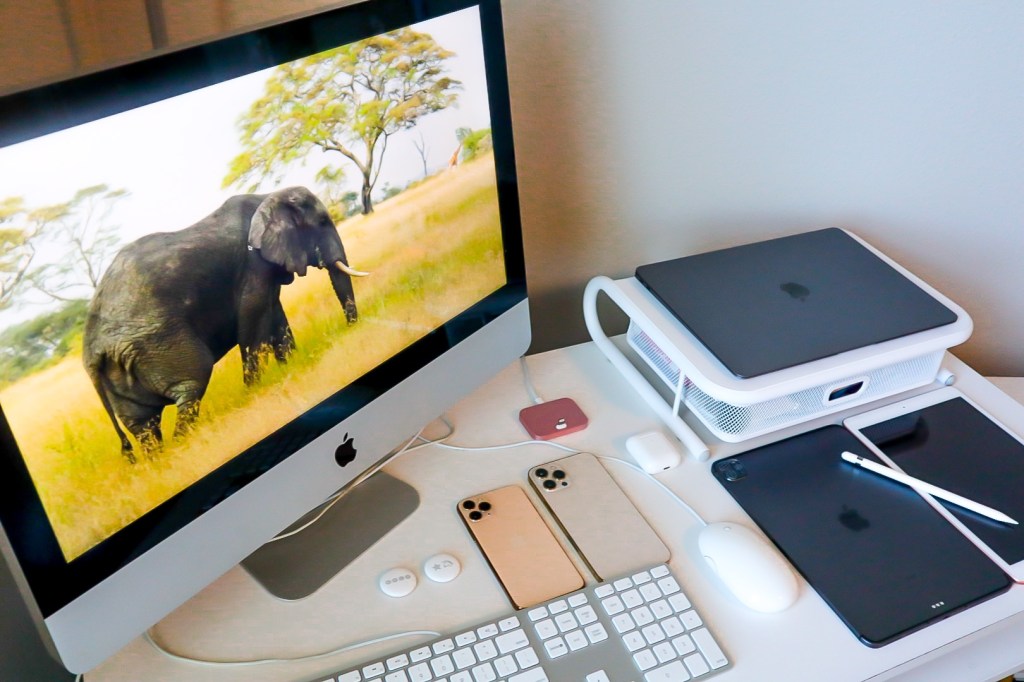
- iPhone 11 Pro
- iPhone 12 Pro Max
- iMac
- MacBook Air with M1 chip
- iPad Pro 11 inch with M1 chip
- iPad
- AirPods with wireless charging case
- Apple TV
- AirTags
So yeah, we’re fully immersed in the ecosystem. Apple just also introduced a few updates to some of its product line. Since just buying the MacBook Air and iPad Pro both with M1 chip, I’m not rushing to the Apple store any time soon. But with WWDC 2021 happening this week, I am eager to learn what new software will be available.

I don’t have a degree in computer science and I’m not a super smart engineer. Actually the older I get, the more I want to learn to not be that elder that doesn’t know how to use their smart phone. Here’s a list of apps and tasks we use our Apple devices for.
Apple One
If you’re a part of the Apple Ecosystem you are aware that Apple offers subscriptions for some of their services. If you’re not aware of the services they offer, let me share – Apple Music, Apple TV, Apple Arcade, Apple News, iCloud Storage, and the newest service Apple Fitness +.
Apple One bundles the services into one subscription. For families this is great. If you’re on the individual plan, it may be something you want to research more to see what’s best for you. But for us, it is a great option for the family budget.
Apple One has three tiers: Individual, Family, and Premier. Here’s a tip to decide which is best for you – look at the amount of storage the iCloud subscription offers. Before Apple One was introduced, I was paying separate monthly fees for Apple Music, Apple TV, and additional iCloud storage. Both Apple Music and iCloud storage were on a family plan so total costs for the three were approximately the amount the new Apple One Family plan is, but with this you now get Apple Arcade. Having teenagers within the overall family made this appealing. But the iCloud storage just wasn’t enough with everyone, so we went with the Premier bundle.
Premier offers Apple Music, Apple TV+, Apple Arcade, 2 TB of iCloud storage, Apple News+, and the new Apple Fitness+. Something for everyone and only $29.95/month. This is what works best for our family. You can find more information about Apple One services here to see what is best for you and yours.
Now if only Apple could do something similar with their Apple Care services. That’s would be amazing!
Pinterest is one of Rhiyan’s favorites. It reminds me of the digital stylebook Cher had in “Clueless” to help her choose her daily outfits. Having a collection of pins and boards allows users to discover new ideas for specific areas of interest. We are using Pinterest a lot these days as we prepare for summer travel which includes a couple of trips to Walt Disney World.
Not only do we use Pinterest for travel tips, it can also be a great site to search for recipes and business tips. Pinterest can be used via app or directly through its website. But you must have an account to fully experience all that it offers. If you’re new to Pinterest and looking for ideas, feel free to view our page and pin away!
Procreate
In the past I would draw as a way to create a calm environment after a stressful day of work and college classes. When the world went into quarantine, I tapped into those skills again. But this time I wanted to try out digital art. Procreate is mostly used on iPad but also has a Pocket version for iPhone.
Procreate is a digital graphic and painting app that allows users recreate the natural feel of physical drawing. You can use your fingers but having an Apple Pencil brings out the best of the app. Your device will determine which version of the Apple Pencil you will need. The new iPad Pros require he 2nd generation Apple Pencil.
Procreate is available for a one-time fee of $9.99 and in my opinion definitely worth it.
Stickies
I can be overly organized and use both physical and digital planning styles. Post it notes are a huge part of our organizational systems and we were so glad to find an option for the computer. When using the iMac or MacBook Air, the Stickies app is the perfect way to take quick notes, make to-do lists, and create a digital background message. If you are a color coordinator with your notes, this option is available as well in Stickies.
Widgets
Widgets are useful on both the iPhone and iPad. They can be added to your Home Screen to have apps you regularly use regularly accessible. With the latest iPad update, this option will be available as well. I use the stock widgets to make it easier but Rhi uses an app called WidgetSmith that allows her to customize her widgets. With Widget Smith, you can add photos, colors, animations, etc to your iPhones and iPads.
There are some limitations with third party apps in what can be displayed in the widget. Using Apple’s shortcut can help with this. But if you’re like me and want to stay simple, Apple is compatible with a number of frequently used apps.
If you’re a Apple product fan I definitely recommend you watch the replay of the WWDC21 keynote. You’ll be just as excited as I am on what’s coming to the Apple ecosystem.
 Mommy Daughter Adventures